
AI excels at generating content in Markdown - a lightweight markup language designed for plain text formatting. Ask a model to write a report, and it naturally produces markdown: headings marked with hash symbols, emphasis with asterisks, lists with dashes. The syntax is clean, consistent, and easy for both humans and AI to work with.
But business documents usually require more than markdown can express:
- A report with page headers showing client identifiers and page numbers
- A financial summary with complex tables requiring custom borders
- A legal contract with precisely formatted clauses, section numbering, and signature blocks
- An inspection report that hides entire sections when certain findings aren't present
These documents need capabilities markdown doesn't provide: page control, non-standard table layouts, conditional content display, and fine-grained styling. Yet you still want to leverage AI's inherent ability to generate markdown content.
What Markdown Does Well
Markdown was created in 2004 by John Gruber as a way to write formatted text using plain text syntax. The goal was readability: a markdown document should be readable as-is, even without rendering.
Basic markdown includes:
- Headings: # for H1, ## for H2, ### for H3, etc.
- Emphasis: *italic* or **bold**
- Lists: Dashes or numbers for bulleted and numbered lists
- Links: [text](url)
- Images: 
- Code blocks: Indentation or backticks
- Tables: Basic grid layouts using pipes and dashes
This simplicity is markdown's strength. AI models trained on vast amounts of text naturally understand markdown conventions. When you ask for formatted output, markdown is what they reliably produce.
For content-focused documents - blog posts, emails, technical documentation, internal notes - markdown is often sufficient. It separates content from presentation, remains readable in plain text, and converts easily to HTML or other formats.
But business documents frequently demand more.
Where Markdown Hits Its Limits
Consider a report that needs to present test scores in a table. Markdown can create a simple grid:
| Test   | Score | Percentile |
|--------|-------|------------|
| Test-1 | 115   | 84th       |
| Test-2 | 108   | 70th       |
But it can't express more complex requirements. You may need rich formatting capabilities that provide:
- Page control: Headers, footers, page breaks, page numbering
- Advanced tables: Cell spanning, borders, shading, precise sizing
- Layout precision: Spacing, alignment, positioning
- Dynamic content: Conditional display, data-driven repetition, calculated values
- Styling flexibility: Named styles, corporate branding, consistent formatting
This is where document formatting standards like XSL Formatting Objects (XSL-FO) become relevant.
Rich Formatting Through XSL-FO
XSL-FO is an open standard for describing document layout and formatting. Originally designed for transforming XML into printable documents, it provides precise control over page layout, typography, tables, and graphic elements.
The standard maps closely to capabilities in word processors like Microsoft Word and Google Docs: margins, padding, borders, fonts, colors, tables, lists, page sequences. But unlike most word processor formats, XSL-FO provides a machine-readable file format that software can generate programmatically.
What's needed is a way to combine markdown's accessibility for content generation with rich formatting's power - without requiring technical expertise.
Bridging the Gap: Tag's Approach
nSymbol Tag demonstrates one way to bridge this gap. It combines both within a familiar word processor interface.
How It Works
Tag reports are data-driven documents. They drive off data fields that are filled using forms.
AI fields are special and are named using a "_ai " postfix. They allow you to attach custom prompts that fill the field for you, usually by drawing on other data fields in the report.
AI fields can be used to gather summaries - e.g., to summarize all data entered in that form. If the AI model returns markdown (which it does by default), Tag will convert that into the equivalent rich formatting instructions. When the final result document is generated, the markdown component returned by AI is indistinguishable from all other content.
This even works for headings, tables and lists. The markdown headings (H1-H5) map to customizable named styles in the document, ensuring consistent formatting.
This layered approach lets different contributors do what they do best. AI generates narrative content in markdown. Subject matter experts refine the surrounding content. Document designers ensure professional formatting and branding. Technical users add conditional logic and dynamic content where needed (discussed further in the next article).Markdown in Prompts and Writing Samples
Markdown plays another important role in Tag: communicating formatting intentions to AI models. When you send a prompt requesting content, you can include markdown formatting in your instructions or writing samples. This helps convey structure.
Tag includes a "limited" rich text editor that accepts only markdown-supported formatting. This editor lets you create prompts and writing samples that round-trip between formatted view and raw markdown view. You can see formatting visually while editing, but export clean markdown to send to AI models.Here's an example showing how the same content appears in both views:
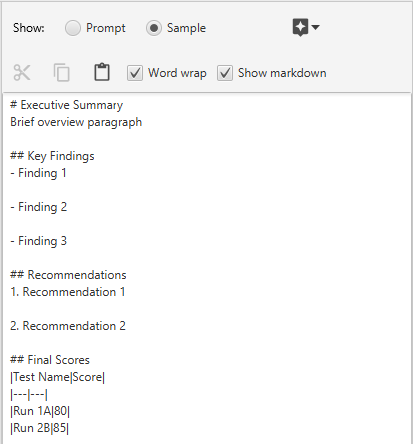 |
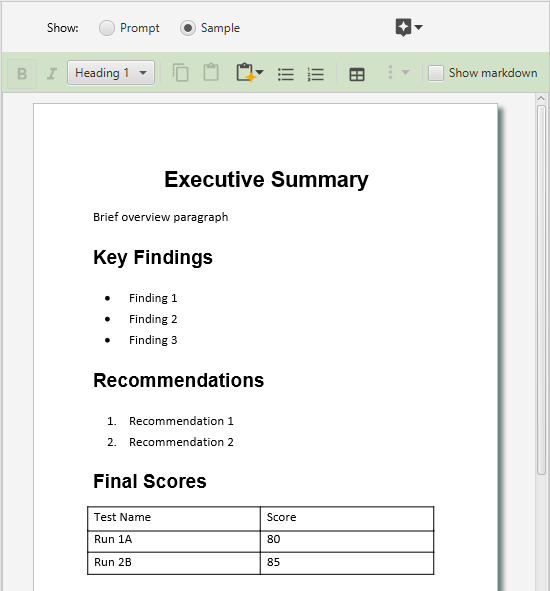 |
Raw
markdown view showing the underlying syntax / Formatted view showing
visual representation of markdown
Professional Documents at AI Speed
The goal isn't to choose between markdown and rich formatting. The goal is to use each where it works best.
Let AI generate content in markdown, where its natural language capabilities shine. Use rich formatting tools to provide the layout, page control, sophisticated tables, and conditional logic that business documents require. Bridge the two with visual editors that make complexity manageable without requiring technical expertise.
This approach delivers professional documents at AI speed while maintaining human control over quality and formatting standards.
Licensed under CC BY 4.0.